This article will go through how to access your Business Profile and how to amend/change details on your Business Profile
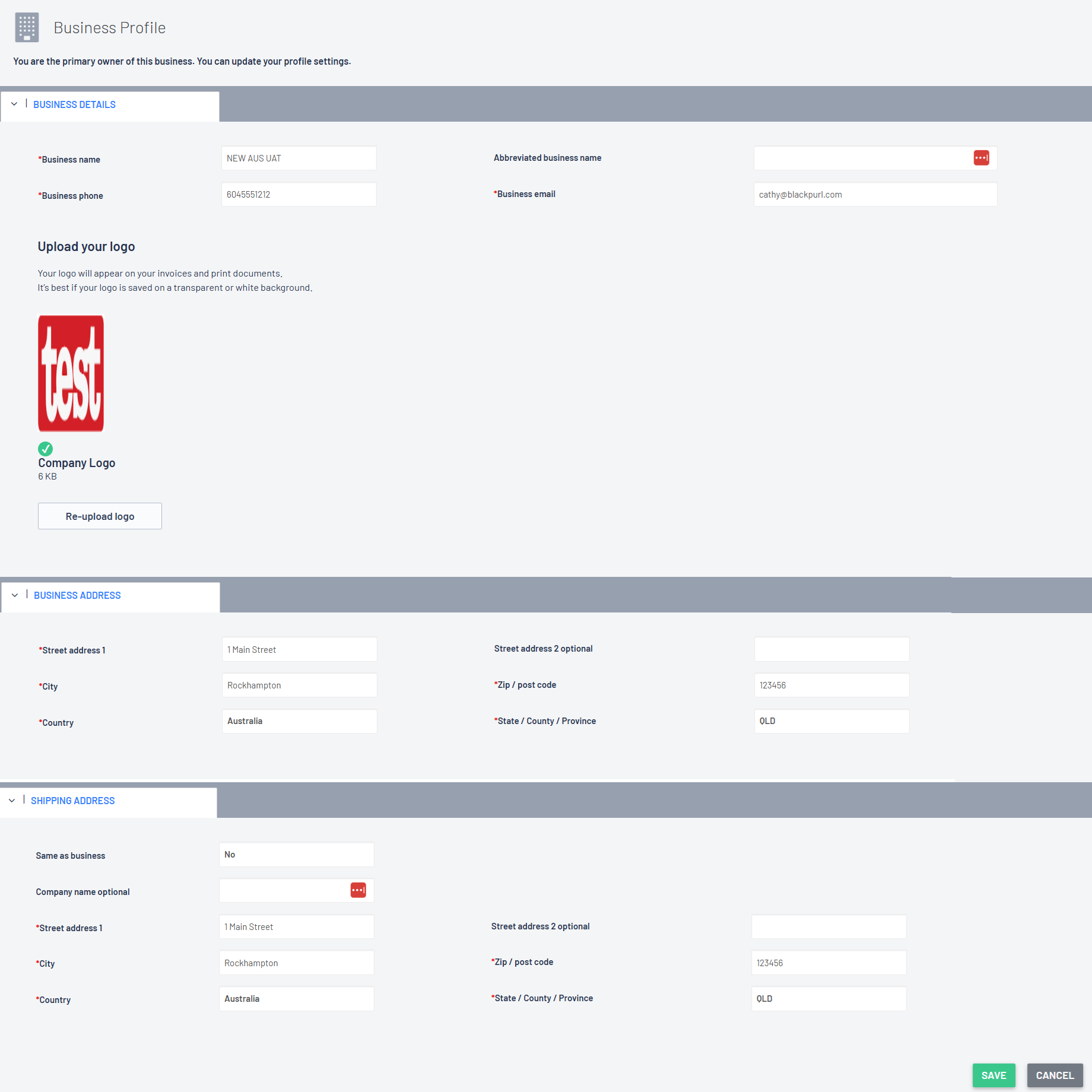
Your Business Profile covers:
> Business Details
Business Name
Abbreviated Business Name
Business Phone
Business Email
Upload your Logo
> Business Address
Street Address 1
Street Address 2 optional
City
Zip / Post Code
Country
State / County / Province
> Shipping Address
Same as the Business Address
OR
Company Name optional
Street Address 1
Street Address 2 optional
City
Zip / Post Code
Country
State / County / Province
How to Access Business Profile and Change any details
- From the Blackpurl Header > click on your Profile icon > Settings
In our example below our Profile icon is  - keep in mind that your Profile icon will be different
- From the System Settings Dashboard > click


- Click in the field that you want to review and / or amend and add your the new information
or if you want to import a new log, click on and follow the prompts
- As this is actually updating your Business Profile settings, you will need to click on

Please note:

If you find that you cannot access the System Settings or Business Profile sections, then you may not have the User Permission to do so

Please discuss any User Permission issues with your Manager
Was this article helpful?
That’s Great!
Thank you for your feedback
Sorry! We couldn't be helpful
Thank you for your feedback
Feedback sent
We appreciate your effort and will try to fix the article